John Deere Operations Center: Here’s What Fleet Managers Can Actually Do with It
Key Highlights
- JDLink connects Deere and supported mixed-fleet machines, while Operations Center turns their data into useful fleet information.
- Custom alerts help managers monitor utilization, idle time, fuel use, machine locations, and project activity.
- Integrated maintenance tools help fleets plan service, diagnose problems, order parts, or shift more responsibility to Deere dealers.

Fleet managers manage a lot. They manage machines and attachments. They manage hours, location, fuel, and maintenance. They field service calls. They coordinate mechanics and service vehicles. They admin parts, fluids, and lubricants. They occasionally go all Magnum, P.I. and hunt down missing machines. It’s a lot of moving pieces, and increasingly, all those pieces generate a new type of management — data management. Today’s construction equipment continually stream data points about everything from location to fuel burn. That flood of information can easily become another thing to manage, or (just maybe) it can become a tool for managing everything else better.
That’s the basic idea behind John Deere Operations Center. It’s Deere’s cloud-based fleet management platform for monitoring connected equipment, and it’s helping fleet masters make better decisions with data.
How does it all work?
“Operations Center is designed to turn individual machine data points into a clear picture of how the entire fleet is performing,” says Katie Voelliger, product marketing manager at John Deere. “Fleet managers can compare utilization, idle time, fuel consumption and maintenance needs across machines and jobsites, then use those insights to rebalance equipment, address operator-training opportunities or schedule service. Ultimately, that can mean less unnecessary idle time, better equipment utilization and more productive hours on the job.”
JDLink connects the machine to Operations Center
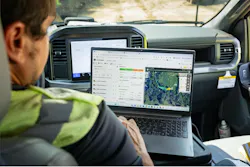
Let’s start with JDLink. JDLink is the connectivity hardware and service that moves information between a John Deere machine (or other brand) and the owner’s Operations Center account. So we’re clear: JDLink and Operations Center are not the same thing. Think of JDLink as the connection. Operations Center is where you actually use the information.
Deere says JDLink comes standard on most new models of construction equipment. Once connected, a machine can automatically send operating information into Operations Center. That data can include machine location, engine hours, engine load, utilization, idle time, travel time, working time, payload, cycle counts, fault codes, temperatures, pressures, battery voltage, regeneration activity, grade-control information, so many things!
“We know most contractors operate mixed fleets, so Operations Center is designed to provide visibility beyond John Deere equipment,” says Voelliger. “Supported non-Deere machines can be brought into the platform through compatible connectivity hardware or data-sharing connections, giving fleet managers one place to monitor core information such as location, hours and equipment status. The level of detail depends on the machine and connectivity source, while compatible JDLink-connected John Deere machines can provide deeper machine-specific information, including utilization, fuel data, and diagnostic trouble codes.”
How much does this all cost? Sharing basic machine data does not require an additional subscription, says John Deere. But fleets can pay for tools such as John Deere Operations Center PRO Service, which adds lots of cool stuff: advanced diagnostics, repair information, live diagnostic readings, tests and calibrations, and controller reprogramming capabilities on compatible machines. Deere says customer licenses for Operations Center PRO Service start at $195 per machine annually.
Alerts, Jobsite Manager, and Summary Cards
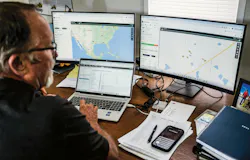
We suggest busy fleet managers start off by setting up some alerts in Operations Center. Create custom alerts around conditions such as idle time, machine speed, fuel levels, or location. If a machine crosses a defined threshold, the system can flag it and let you know. That’s just one example. Complementing the efficiency of alerts, Deere has also created tools in Operations Center to help users crunch numbers and see the data better. The Jobsite Manager tool organizes data around a project. Fleet managers can create jobsites — or allow Operations Center to automatically create them — and see the connected equipment working at each location. Summary Cards then roll that information into quick snapshots of job progress — fuel consumption, machine locations, and unit utilizations. Instead of checking 15 machines individually, a manager can step back and get that 30,000-foot view.
Machine Analyzer and Remote Display Access
This is one of our favorite widgets in Operations Center — the Machine Analyzer. Instead of simply seeing that a machine logged 10 engine hours, you can dig into how those hours were spent — working, idling, or traveling — and compare utilization and fuel consumption across machines and periods of time. The Machine Analyzer helps turn all those individual data points into patterns. What’s even cooler? John Deere recently updated Machine Analyzer to monitor the use of grade-control technology and payload weighing.
“Investing in technology is only valuable if it is being used, and Machine Analyzer helps fleet managers understand whether that is happening,” notes Voelliger. “On supported machines, managers can review the use of grade-control and payload-weighing technology alongside working, idle, and travel time. That visibility can help identify where technology is delivering value, where additional operator training may be needed and how adoption changes over time.”
Here’s another interesting service: Remote Display Access. With compatible equipment, an authorized person can remotely view and interact with the machine display. That creates the ability to help with troubleshooting or setup assistance without immediately sending someone to the jobsite. Everyone stays put.
Equipment Mobile is in the palm of your hand
John Deere also offers its Equipment Mobile app, which is aimed at everyday equipment management on a phone or tablet. Users can find searchable operator’s manuals, maintenance schedules, parts info, service history, and upcoming maintenance items. Deere has also added what it calls Maintenance Plan Auto Assignment. The feature lets customers add factory maintenance plans to machines and see the specific parts required for upcoming service. Then, there’s Shop.Deere.com, which adds parts diagrams, service videos, maintenance schedules, and parts purchasing.
And then there’s John Deere Protect

In the back of your mind always remember that analytics and maintenance can be outsourced. Check out John Deere Protect. Deere offers maintenance plans that connect scheduled service with inspections, fluid analysis, machine monitoring, remote diagnostics, parts, fluids, and dealer support. Depending on the plan, fleet owners can perform scheduled maintenance themselves or have certified John Deere technicians handle it.
“Operations Center provides the machine information that helps customers and dealers understand maintenance needs, while John Deere Protect helps turn those insights into a more proactive maintenance approach,” explains Voelliger. “Customers can choose a Parts & Fluids Maintenance Plan if they prefer to perform scheduled maintenance themselves or a Core Maintenance Plan that places scheduled service in the hands of certified John Deere technicians using genuine John Deere parts and fluids. For contractors looking to hand off more of the maintenance burden, the Core plan and additional services available through participating dealers can provide a more dealer-managed approach, with exact options varying by machine and dealer.”
About the Author
Keith Gribbins
Keith Gribbins is the head of content at Construction Equipment, where he leads editorial strategy across print, digital, video, and social channels. An award-winning journalist with more than 20 years of experience, Keith has won 17 national and regional editorial awards and is known for his hands-on reporting style, regularly visiting manufacturers, operating equipment, and covering major industry events worldwide.